
Overview
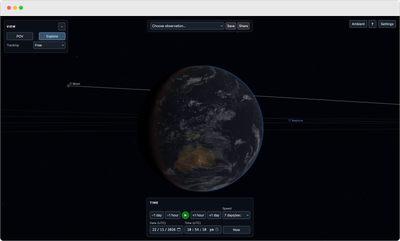
A browser based astronomy simulator for exploring the Solar System from different viewpoints and points in time.
It combines astronomical calculations, NASA and JPL datasets, and real time 3D rendering to simulate planetary positions, moons, eclipses, shadows, atmospheres and the surrounding night sky.
The project
Space Telescope is a personal passion project, built because I enjoy astronomy and wanted to see how far I could push a browser based simulation of the Solar System.
The project started as an experiment in rendering a topographically accurate 3D Moon in the browser and gradually expanded into a broader Solar System simulator.
Users can move through the Solar System, explore every planet and the major moons, change the observer's date and location, accelerate time, and watch events such as solar and lunar eclipses develop from the surface of Earth within the simulation.
Astronomical positions, relative sizes, lighting and eclipse geometry are calculated in physical space. Astronomical distances are converted uniformly into practical rendering units for presentation because true Solar System scale is not practical for an interactive 3D view.
Technical highlights
- Astronomical positioning - Date dependent positions for the Sun, Moon, planets and major moons.
- NASA/JPL SPICE integration - Major moon ephemeris and orientation data loaded and evaluated in the browser using WebAssembly.
- Eclipse and shadow geometry - Solar and lunar eclipses calculated from the positions and dimensions of the bodies, including umbra, penumbra and antumbra.
- Celestial shadows - Moons cast shadows on planets, and planets cast shadows on their moons using the same simulated geometry.
- Planetary atmospheres - Procedural atmospheres for Earth, Mars and Titan with scattering, haze, density and extinction based on the characteristics of each world.
- Lunar and planetary surfaces - NASA, JPL and USGS imagery and elevation data used for planets and major moons.
- Star catalogue - Thousands of stars rendered using astronomical position, magnitude and colour data.
- Milky Way rendering - Large scale galactic structure incorporated into the surrounding sky.
- Continuous exploration - Free movement throughout the Solar System, including every planet and the major moons.
- Time simulation - Arbitrary UTC dates, event presets and accelerated playback.
- Real time WebGL rendering - Interactive camera movement, terrain, lighting, atmospheres, shadows and continuously updated astronomical geometry.
- Ambient Mode - Hides the simulator interface and adds a slow automatic camera drift while the simulation continues running.
- Responsive controls - Desktop and mobile interfaces designed to keep the simulation itself visible.
Exploring the Solar System
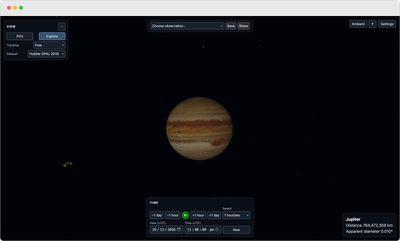
The simulator includes every planet and 20 major moons across Earth, Mars, Jupiter, Saturn, Uranus and Neptune.
All of these bodies exist within the same simulation and can be explored directly. Planetary and moon imagery is sourced from NASA, JPL and USGS datasets, with spacecraft derived mapping used where available.
SPICE and the moon system
The major moon system uses NASA/JPL SPICE kernels for ephemeris and orientation data.
SPICE runs directly in the browser through WebAssembly, allowing the simulator to use authoritative position and orientation data without relying on a server side astronomy service.
Phobos, Deimos, Saturn's seven major moons, Uranus's five major moons and Triton use the same SPICE based system, alongside the existing Earth and Galilean moon implementations.
Supporting that many independently moving bodies also required a different approach to trajectory generation. Moon paths are built from cached astronomical positions, refreshed in stages and generated incrementally across frames to avoid blocking the browser.
The moon system is now shared across navigation, tracking, shadows, system context and trajectories, so new moons can be added without rebuilding those systems for each body.
Engineering challenges
Bringing NASA/JPL SPICE into a browser application was one of the largest technical changes in the project.
SPICE is designed around native scientific tooling rather than real time browser rendering, so integrating it meant getting kernel based ephemeris and orientation calculations working through WebAssembly and fitting that data into the simulator's existing astronomy and rendering systems.
Atmospheric rendering introduced a different set of problems. Earth, Mars and Titan use procedural scattering systems that respond to sunlight, viewing direction and planetary shadows while still running interactively alongside the rest of the scene.
Performance became another major concern as the Solar System expanded. Rendering and tracking many moons at once means updating positions, orientations, shadows and trajectories continuously. Historical trajectory generation in particular caused visible stalls until it was reworked around cached data, staggered updates and adaptive work spread across multiple frames.
Those systems now run together in the browser while keeping the simulation responsive.
Atmospheres
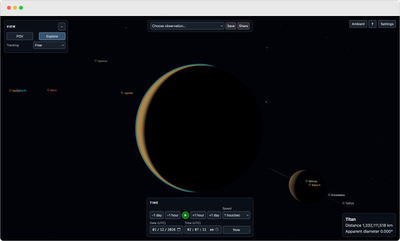
Earth, Mars and Titan have procedurally rendered atmospheres that respond to sunlight, viewing angle and planetary shadows.
Each uses different scattering, haze, density and extinction behaviour based on the known characteristics of that world's atmosphere, with some artistic adjustment for presentation.
Observation and exploration
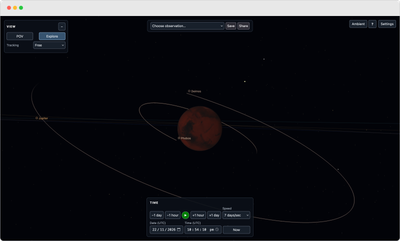
The simulator can be viewed from anywhere in the Solar System.
Every planet and the major moons are part of the same continuous simulation and can be selected, tracked and explored directly.
The same astronomical model drives their positions, orientation, lighting, shadows and relationships with nearby bodies as time moves forward or backward.
Eclipses and time simulation
Users can jump to preset astronomical events, choose any UTC date, or accelerate time to watch the Solar System move and eclipses develop. Solar and lunar eclipses emerge from the simulated positions and dimensions of the bodies rather than from scripted sequences or pre rendered animations.
The current simulation state is stored in URL parameters, including the selected time and observation settings, so specific viewpoints and astronomical events can be linked directly.
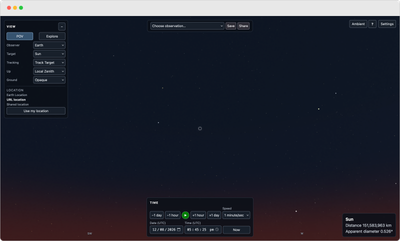
Ambient Mode
Ambient Mode removes the simulator interface and leaves the current astronomical view running as a clean display.
The simulation continues normally while the camera moves slowly over time, allowing the view to change without user input.
Technology
TypeScript · Three.js · WebGL · Vite · WebAssembly · NASA/JPL SPICE · Astronomy Engine · GLSL
Astronomical, planetary and terrain data from NASA, JPL, USGS and stellar catalogues.
Current state
The simulator is live with continuous Solar System exploration, major moon SPICE integration, procedural atmospheres, physical shadows, eclipse simulation, accelerated time and Ambient Mode in place.
Development is ongoing, with further planetary detail, additional atmospheres, minor moons and continued performance work planned.
Project Details
- Role
- Software Developer
- Project type
- Independent astronomy simulator
- Status
- Ongoing independent project
- Website
- View live project →