
Overview
Wrapit is a small browser tool I built to give screenshots a consistent finish for this site.
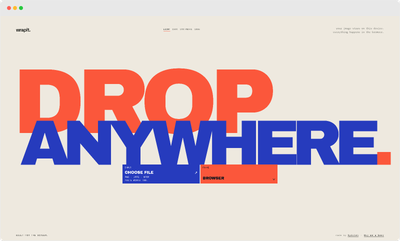
Drop, select or paste an image and Wrapit adds a simple browser, phone or tablet frame. It supports interactive image positioning, zooming, bulk processing and ZIP downloads.
Everything happens locally in the browser. Images are never uploaded.
Why I Built It
I wanted a quick way to prepare screenshots for my portfolio without manually recreating the same framing each time. The tool that I had been using was down, so I decided to build my own.
The interface started as a fairly conventional upload tool, which was boring. Eventually it became a full screen drop target with four visual themes: Light, Dark, Synthwave and 1996.
Browser Image Processing
Wrapit uses Canvas and browser APIs to resize and position images, apply browser or device frames and generate the finished PNG.
Images can be added through drag and drop, the file picker or directly from the clipboard. Multiple images can be processed together, adjusted individually and downloaded as PNGs or a ZIP.
Screenshots can be presented inside browser, phone or tablet frames, with portrait and landscape orientations. Images can be fitted to contain or cover the available screen, then repositioned by dragging and zooming directly inside the frame. The background colour can also be customised.
All processing happens on the user's device, with no backend or image uploads.
Interface and Themes
The interface is built around the drop interaction rather than a conventional upload form. The page itself acts as the drop target, with the image becoming the main focus once it has been processed.
Light, Dark, Synthwave and 1996 provide four deliberately different versions of the interface. The themes only affect Wrapit itself and never change the generated image.
Results
Wrapit now does the job I originally built it for: quickly preparing consistent screenshots without uploading them anywhere or opening an image editor.
What started as a simple browser screenshot wrapper has grown into a small image composition tool, with device frames, interactive positioning and bulk exports.
The source problem was very small. The solution got slightly out of hand.
Project Details
- Role
- Sole developer
- Project type
- Browser image processing tool
- Development
- Designed and built independently
- Status
- Live
- Website
- wrapit.hyduken.com